Know where you stand.

United Kingdom.

Belong UK tracks your journey to settlement and citizenship
one requirement at a time.

iPhone

Out now on iOS

Your tracker stays on the phone. No account, no tracking.

Android

Coming to Google Play

The same tracker, the same 464 questions, the same UK rules.

Coming to Google Play

7 day free trialYour tracker stays on your phoneEvery rule dated and sourced

iPhone
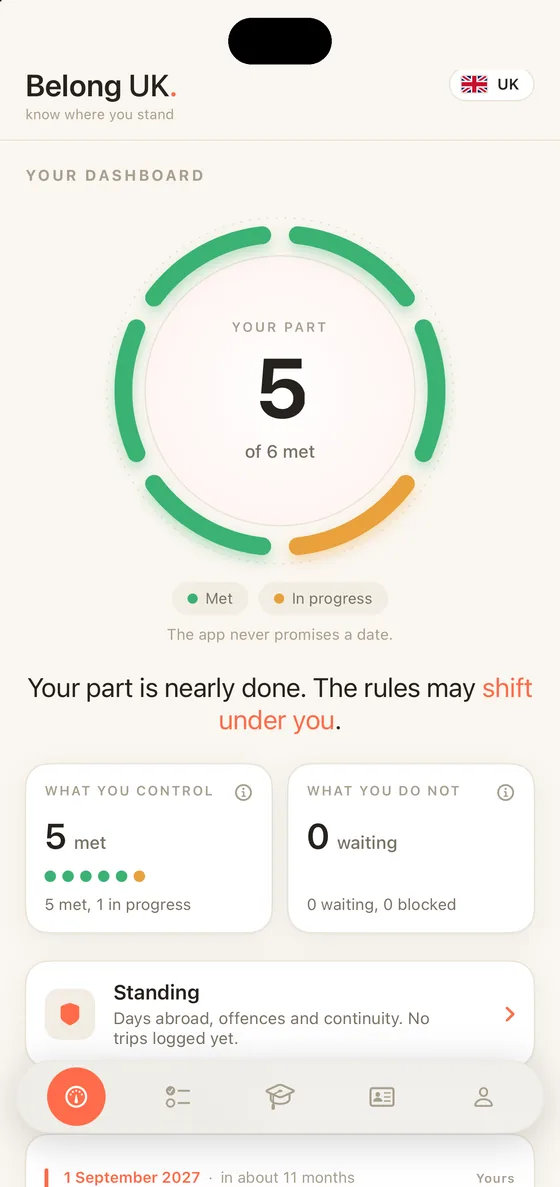
Belong UK on iPhone: the Dashboard with the progress ring
Android
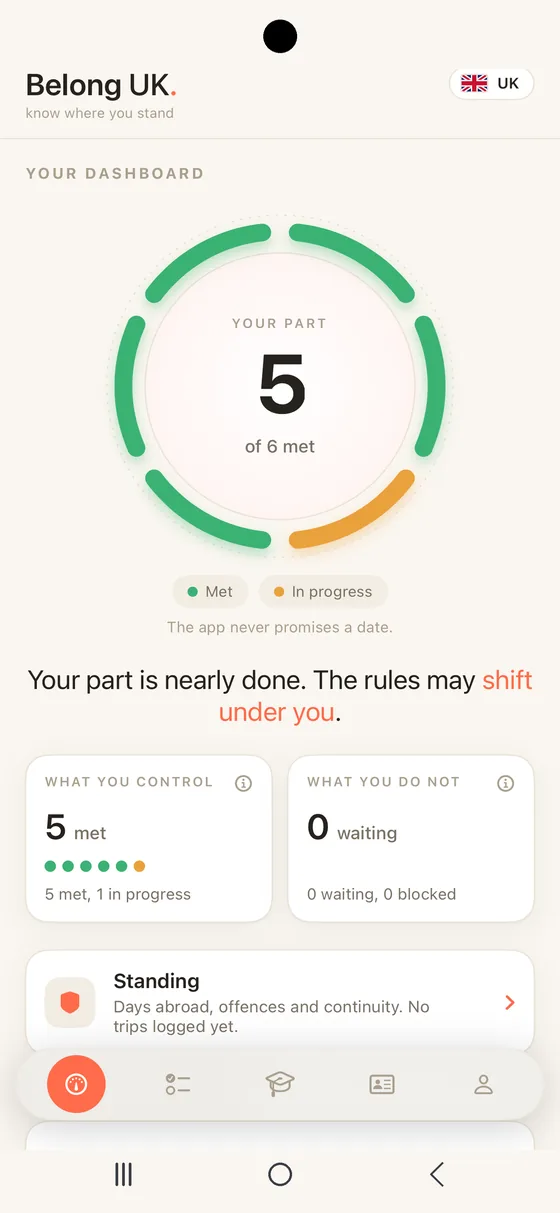
Belong UK on Android: the Dashboard with the progress ring
Privacy, honestly

Everything lives on your phone
and nothing is sent anywhere.

There is no account and no tracking in Belong UK. Here is exactly what that means on each phone.

On iPhone

Out now, and fully on your device.

The iOS app keeps your tracker on your iPhone. There is no account to create and nothing you enter leaves the device. The documents you attach are encrypted by iOS while the phone is locked and are deliberately kept out of your iPhone backup, so they never reach another device. Belong UK never uploads them and never sees them.

Nothing leaves your iPhone
On Android

Built to work the same way.

The Android app is being built to the same rule: your tracker stays on the phone, with no account and no tracking, and documents in the app's own private storage rather than anywhere we can reach. It is not on Google Play yet, so nothing here is live and no link claiming to be it is ours. The screenshots on this page are the same app shown in a Galaxy's frame.

Not published yet

One tracker, and the same promise on either phone: what you type in stays where you typed it.

New look

A new look, built around one ring.

The Dashboard now opens on a ring with one segment per requirement on your route. Green is met, amber is in progress, red is blocked and the number in the middle is how many you have met. Every tab got the same treatment: one colour per tab, clear boxes and coral on the details. Out now on iPhone. On Android it arrives with the app, coming to Google Play.

Belong UK Dashboard on iPhone with the progress ring
iPhone
Belong UK Dashboard on Android with the progress ring, coming to Google Play
Android, coming to Google Play
The app, screen by screen

Same app, two phones. Switch and every screenshot below follows.

Dashboard

How far am I, really?

The Dashboard splits the journey into the part you control and the part you do not. The ring shows how close you are, one segment per requirement, green when met, amber in progress, red when blocked. The number in the middle is how many you have met. Below it Belong UK lists the routes open to you: the five year Skilled Worker route, the five year partner route and ten year long residence, each carrying its own status. The journey has two milestones, Indefinite Leave to Remain and then naturalisation, and the Home Office decides both against published requirements, so your route reaches a real finish line.

What's coming sits just under that split: the dates ahead of you, soonest first. The day your residence time is complete, the day after a trip ends, each year of residence as it lands, a document about to expire. Every date says whether it is yours or the authority's, and one that is only a projection says so. On either phone you can turn on alerts from the You tab and get a handful a year, with notice, never a feed.

New Every alert opens what it names. Tap a date alert and the Dashboard opens on that row. Tap the Daily 5 reminder and the round opens, with the question it quoted inside it.

The headline reads straight off the meter, so the words can never say more than the ring does, and right now it also says that the rules may shift under you. The government has confirmed it will move standard settlement from five years to ten, with reductions for contribution; that is not law yet, the live GOV.UK pages still say five, and the app computes on the rules in force while carrying the reform honestly on the Dashboard. Standing sits there too, a card one tap from the meter it explains. Every tab is headed with the date the rules it uses apply from.

New After you apply. Tell the app the day you filed and the Dashboard follows the wait with you: days since filing, GOV.UK's page on what happens after you apply one tap away and the updates you log from the Home Office's letters, with a reply window that becomes a date ahead and an alert. GOV.UK says a decision usually comes within six months; that is a service standard, not a deadline, so the app shows no expected date.

Your fastest eligible route always rises to the top. Routes that do not apply to your situation fold away below.
Belong UK Dashboard tab on iPhone with What's coming Belong UK Dashboard tab on Android with What's coming
What if

What if I passed B1 tomorrow?

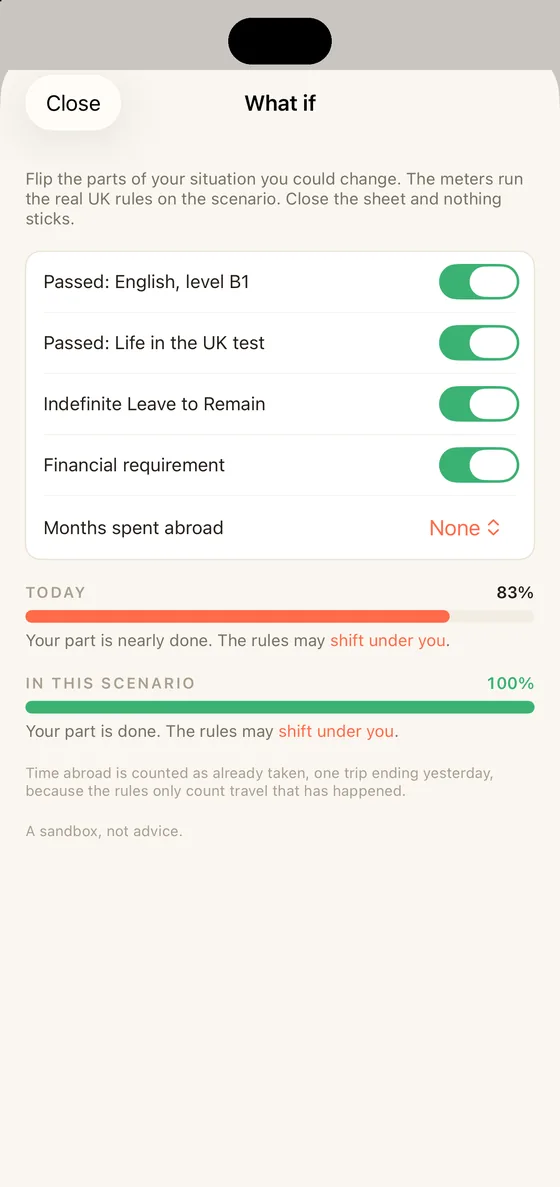
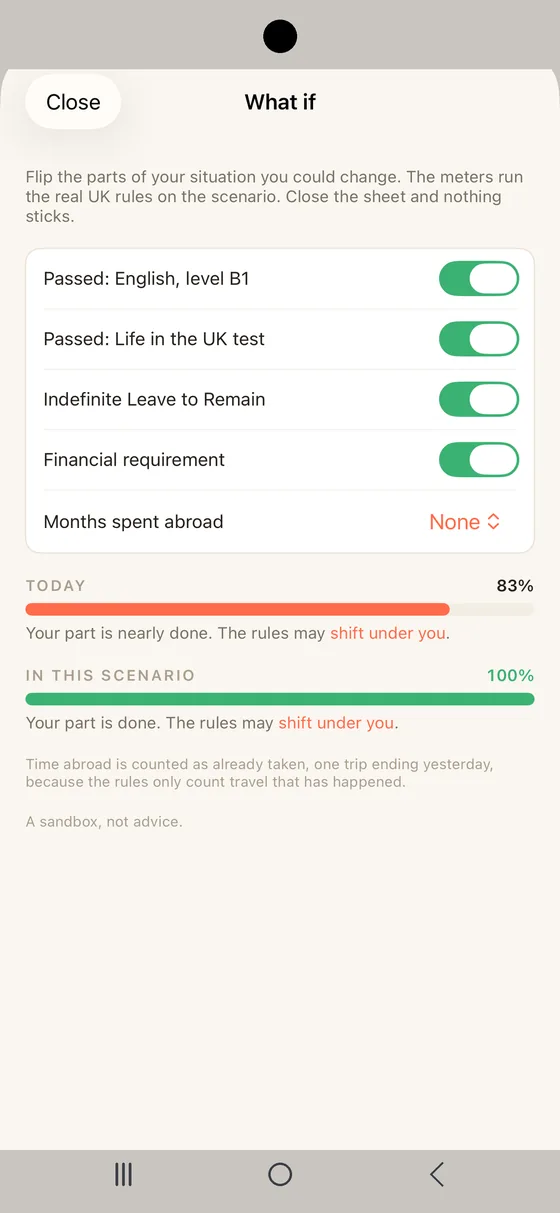
What if sits on the Dashboard and answers that without touching your file. Flip English at B1 or the Life in the UK test to passed, add Indefinite Leave to Remain or the financial requirement, spend months abroad and watch your finish line move under the real UK rules. It runs on a copy of your situation, so nothing you try is saved and nothing you entered changes.

A sandbox, not a promise. The same rules that drive your Dashboard drive the scenario, and the Home Office's own queue still belongs to the part you do not control.
Belong UK What if sheet on iPhone running a scenario Belong UK What if sheet on Android running a scenario
Path

What stands between me and the decision?

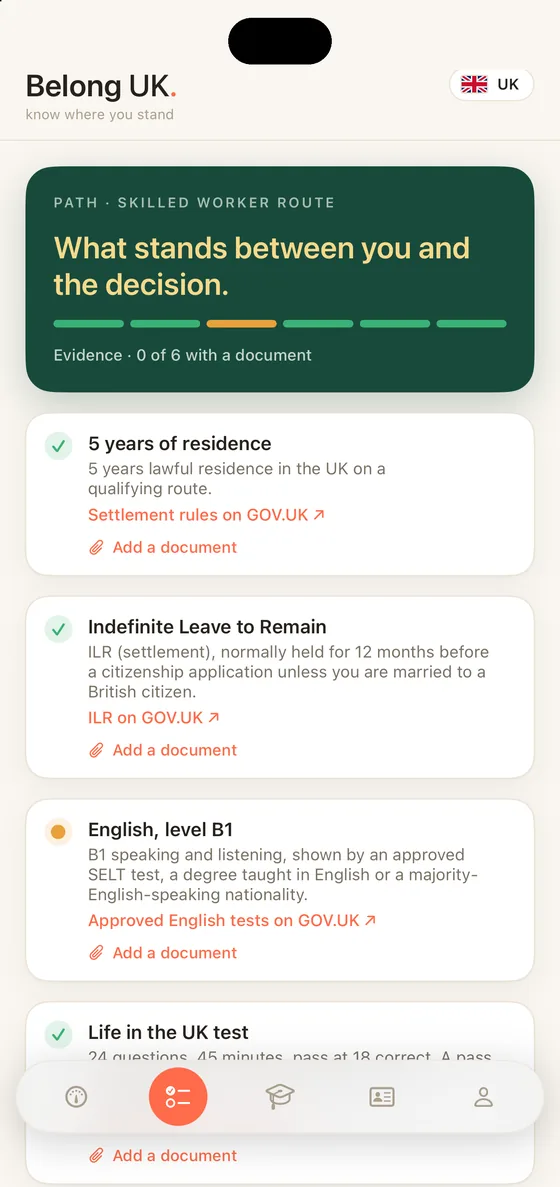
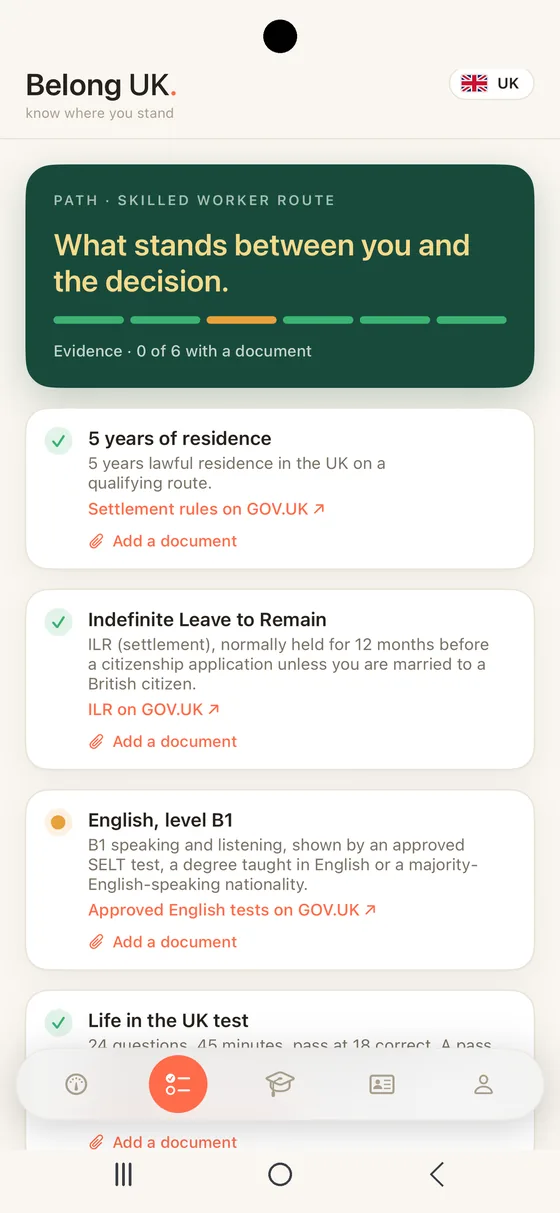
Path opens your route and lays out every requirement in order. A green tick is met and a coral dot is in progress: five years of lawful residence on a qualifying route, Indefinite Leave to Remain, English at B1 in speaking and listening shown by an approved SELT test, a degree taught in English or a majority-English-speaking nationality, the Life in the UK test, good character and your route's own financial requirement, which is the Skilled Worker salary threshold at settlement or the partner route's 29,000 GBP minimum income. Each item explains the rule in plain language and links to the official source on GOV.UK. The test facts sit here too, and the full Practice tab is one tap away.

Path is also plain about the facts people meet late. You normally hold ILR for 12 months before a citizenship application, and the spouse of a British citizen does not, and can apply after three years in the UK rather than five. Settlement applications made from 26 March 2027 need English at B2 instead of B1, so if your earliest ILR date lands after that, the app says to plan for B2. And Britain asks nobody to renounce: dual citizenship is allowed, and whether your own country lets you keep its nationality is a question for that country's law.

Every requirement can carry the evidence for it: a test certificate, a biometric residence permit, a payslip, a pass notification. Note when a document expires and that date joins What's coming a month ahead, so a certificate never lapses quietly while you are waiting. Documents stay on the phone you added them on. On iPhone they are encrypted by iOS while it is locked; on Android they will sit in the app's own private storage. On both they are kept out of the backup, so a restored phone will not bring them back, and you should keep your own copy of anything hard to replace. Belong UK never uploads them and never sees them.

Married to a British citizen? Citizenship after three years, with no 12 month wait after ILR. Path knows the difference.
Belong UK Path tab on iPhone with every requirement on the Skilled Worker route Belong UK Path tab on Android with every requirement on the Skilled Worker route
Standing

What could set me back?

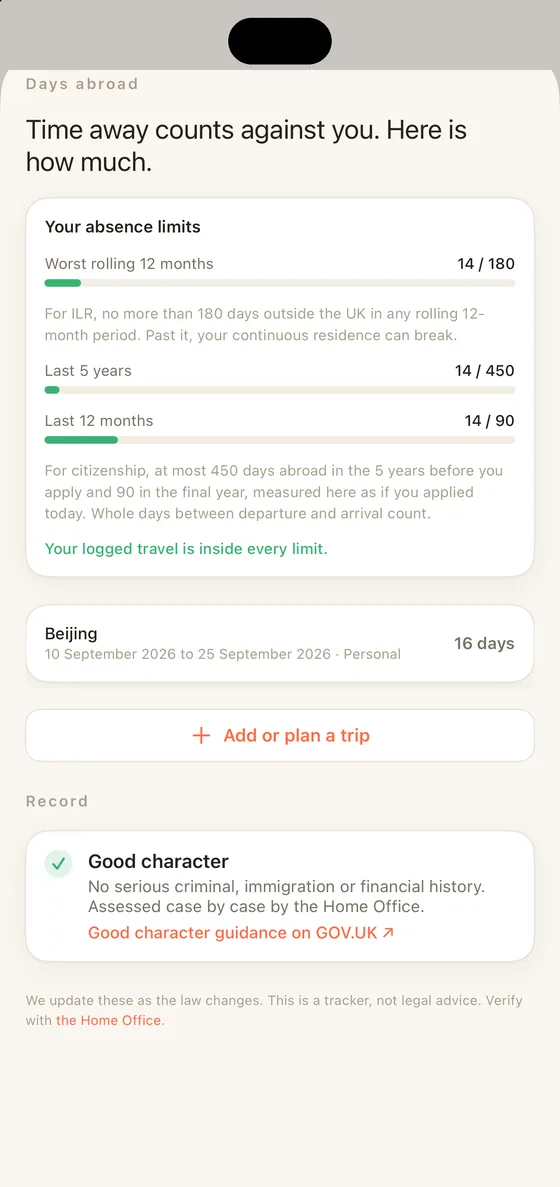
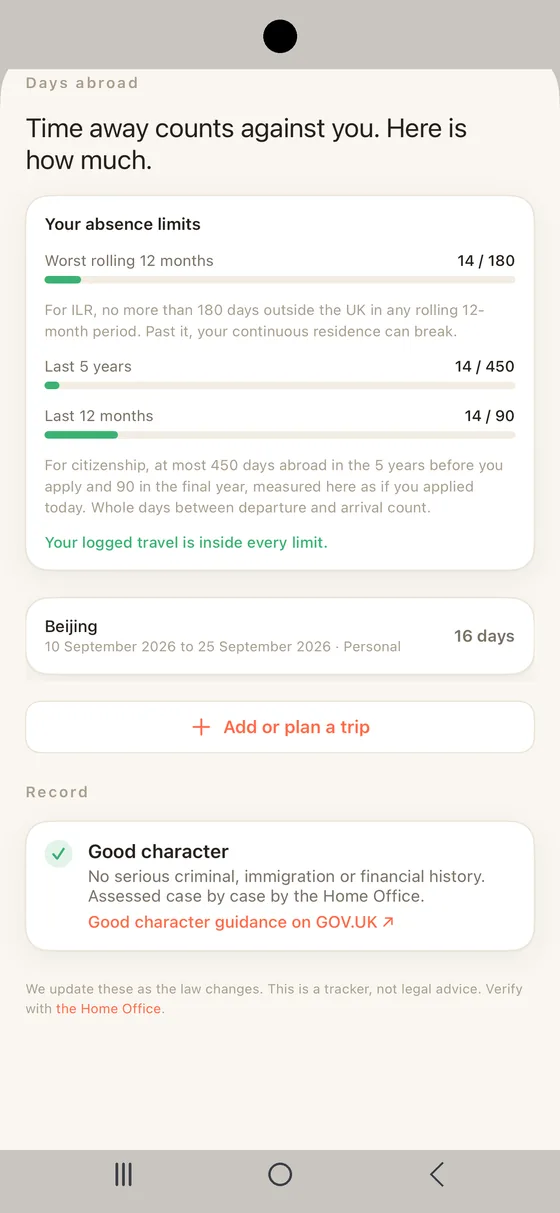
Standing watches the moving ground, your time abroad and your record. The UK keeps two separate counts, and they are often confused. For ILR, at most 180 days outside the country in any rolling 12 months, so Belong UK measures your worst rolling year against the 180 day line and tells you honestly when a trip could break your continuity. For citizenship, 450 days over the five years and 90 in the final year, and Standing watches those too. Whole days between departure and arrival count. Your record sits here as well, with a plain read on good character, which the Home Office assesses case by case and no app can honestly compute.

Standing lives on the Dashboard, one tap from the meter it explains: a card with your trip count opens the full view, with trips, record and continuity all editable.

New Plan a trip before you book. Add a trip dated ahead and the trip sheet shows what the days away would do to your worst 12 months, counted the Home Office way, on a copy of the real rules. Planned trips sit in their own group, marked as planned, and count for nothing until they have started. The day after a trip ends, What's coming asks whether the dates held.

One long stretch abroad echoes through twelve months of rolling windows. Standing is where you keep the count straight.
Belong UK Standing sheet on iPhone measuring time abroad against the 180 day rolling limit and the citizenship counts Belong UK Standing sheet on Android measuring time abroad against the 180 day rolling limit and the citizenship counts
Practice

Could I pass the Life in the UK test today?

464practice questions
5chapters
24in the real test

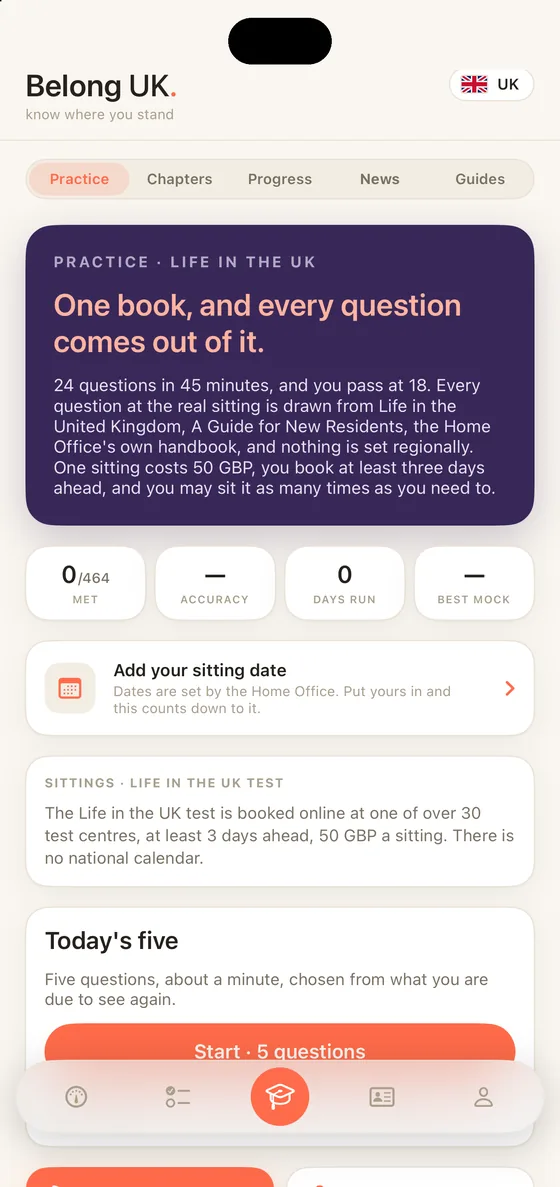
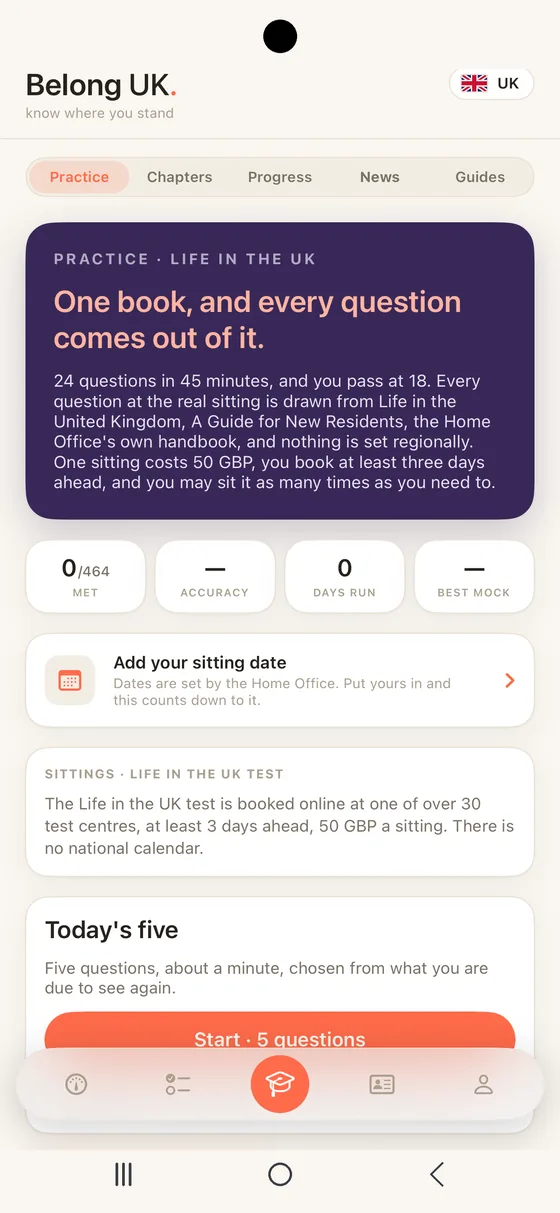
Practice trains you for the Life in the UK test, the real knowledge test for settlement and citizenship: 24 questions in 45 minutes and you pass at 18. Every question at the real sitting is drawn from one book, Life in the United Kingdom: A Guide for New Residents, the Home Office's own handbook, and nothing is set regionally. One sitting costs 50 GBP, you book it at least three days ahead on GOV.UK, and a pass never expires and counts for both ILR and citizenship.

The 464 practice questions sit in the handbook's own five chapters, the values and principles of the UK, what the UK is, its long and illustrious history, a modern thriving society and the government, the law and your role, each showing how much you hold, so you drill the chapter costing you marks rather than the whole bank. The official GOV.UK booking page is one tap away.

The mock is the real thing: 24 questions in 45 minutes, drawn across the chapters in proportion to what the book carries, with the result broken down by chapter and a rematch of only what you missed. Because the whole paper comes from the one book this app writes from, it can tell you passed or not passed honestly. Put your sitting date in and the app counts down to it.

Today's five is about a minute a day: what you get wrong comes back sooner, what you know comes back later. Practice, Chapters, Progress, News and Guides share one tab, a segment apart.

New Three guides, on your iPhone. Short guides written from GOV.UK, on the Life in the UK test, on days abroad and on applying for citizenship, sit inside the app as a Guides segment, each dated to the day its facts were checked, readable on a plane with no connection at all. The Practice tab also says how the Life in the UK test is booked: online, at one of over 30 test centres, at least three days ahead, 50 GBP a sitting.

New On the iPhone, set a daily reminder and it quotes one of the questions waiting for you. Tap it and the round is already open, and once today's five are done, tonight's reminder is withdrawn.

The full paper: 24 questions in 45 minutes, pass at 18
Chapters, in the handbook's order
Rematch only what you missed
This is practice, not the exam. The questions are written by Belong UK from the official handbook's subject areas, each one checked by someone other than its writer, and the real sitting uses the Home Office's own. A pass does not replace the separate proof of English.
Belong UK Practice tab on iPhone: Today's five, chapter drills and the full Life in the UK mock Belong UK Practice tab on Android: Today's five, chapter drills and the full Life in the UK mock
News

What just changed?

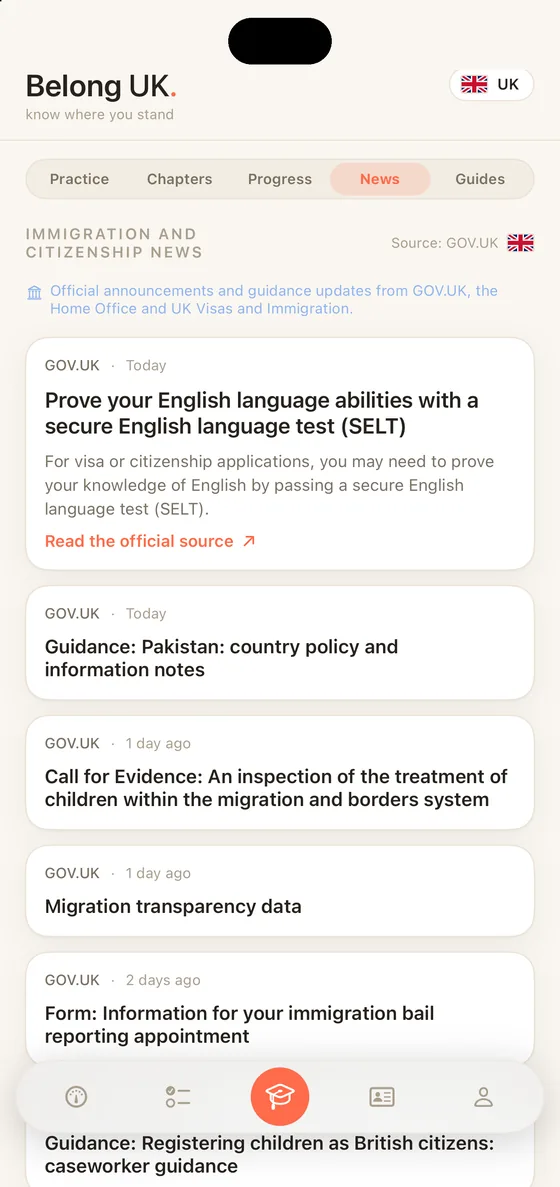
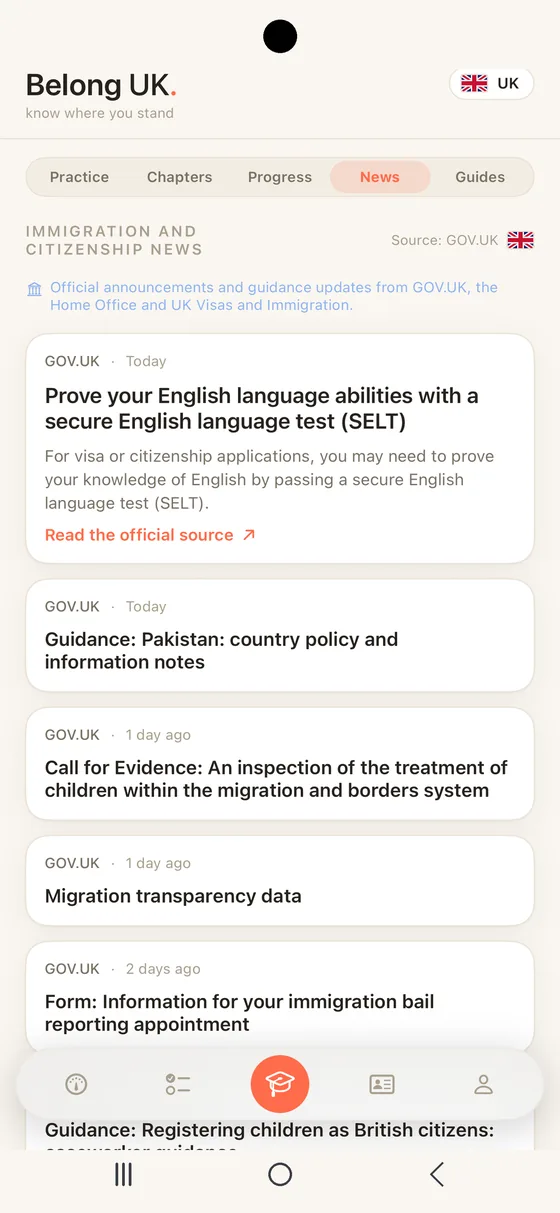
News is live from day one. Belong UK reads the official GOV.UK feeds, Home Office and UK Visas and Immigration announcements, and filters them to immigration, settlement and citizenship, so what reaches you is the news that actually affects your path. The app fetches the public feed and nothing about you travels with the request. Turn on news alerts on the You tab and the app checks in the background and sends one quiet notification when something new is published; one new item opens that item. On iPhone a fourth widget shows the newest one on your home screen or Lock Screen. News sits as one of the five segments alongside Practice, Chapters, Progress and Guides, so what changed is never more than a tap from the drilling.

Straight from the source. Every story links back to the original announcement on GOV.UK.
Belong UK News segment on iPhone showing official GOV.UK immigration and citizenship announcements Belong UK News segment on Android showing official GOV.UK immigration and citizenship announcements
PassportNew

What is waiting at the end?

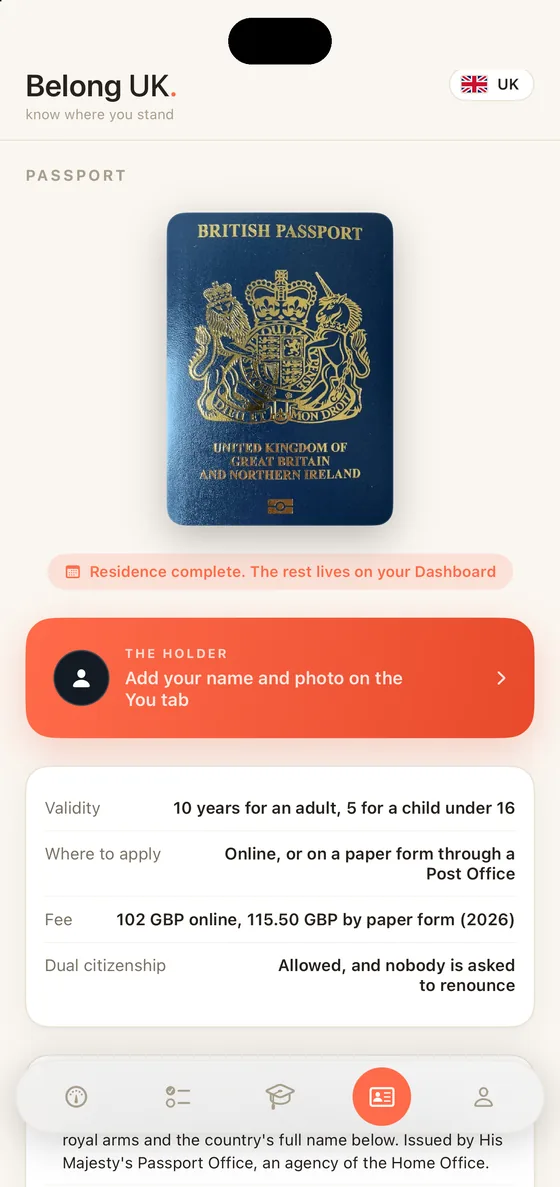
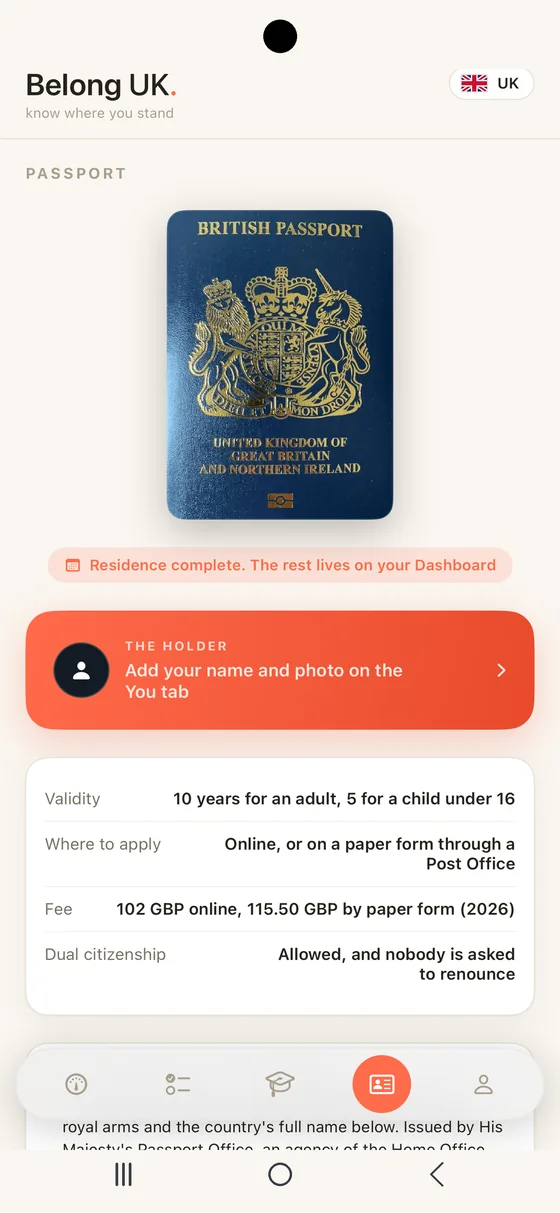
Passport is the newest tab and the reason for all the rest: the document your road leads to. The real cover in colour with the facts that matter beside it: validity, the fee, where you apply and dual citizenship. Every figure is taken from the issuing authority's own published pages, dated and linked to the source.

Add your name, and a photo, and the passport carries them as the holder's. A pill under the cover says when you could apply, at the earliest, from the same figures your Dashboard reads, and the tab tells you what makes this passport particular: navy blue since 2020 with the royal arms on the cover, 34 pages as standard and a 54 page frequent traveller book, biometric since 2006 and the rose, thistle, daffodil and shamrock embossed on the back. Valid ten years for an adult and five for a child under 16, 102 GBP online or 115.50 GBP by paper form, applied for online or on a paper form through a Post Office and issued by His Majesty's Passport Office, an agency of the Home Office.

The passport comes at the end: once citizenship is granted you apply like any citizen. Nobody is asked to renounce, and fees change, so check with the authority before you book.
Belong UK Passport tab on iPhone with the British passport cover and the holder's name Belong UK Passport tab on Android with the British passport cover and the holder's name
YouNew

What drives all of this?

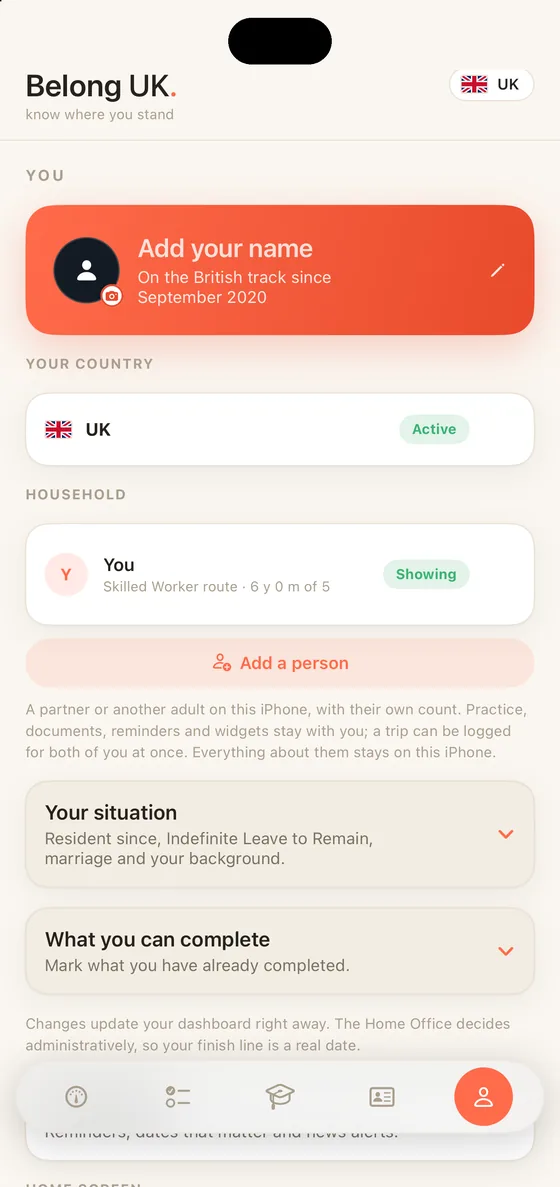
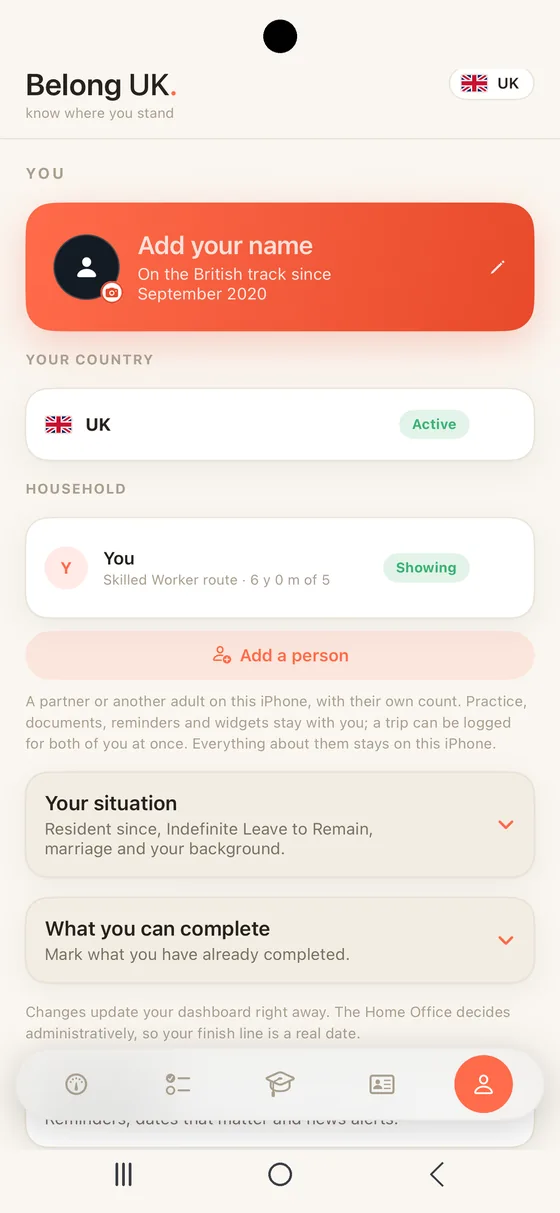
You is where every number comes from. Set the month you became resident and a short list of honest toggles: Indefinite Leave to Remain, marriage to a British citizen, your citizenship background, English at B1, the Life in the UK test and the financial requirement. Change one and the Dashboard updates right away. Your name lives here too, and a photo of you, and the Passport tab carries them as the holder's; both stay on the phone. The legal disclaimer closes the tab, because Belong UK tracks the rules but does not give immigration advice.

New On your home screen. Four iPhone widgets, for the home screen and the Lock Screen: where you stand, your days abroad against the limit that applies to you, whether today's five is done and the newest GOV.UK update. The same numbers the app shows, run through the same rules, and nothing leaves your iPhone. Setting up now ends with your name and the reminders you want, all optional.

New A second person on the same iPhone. Add your partner, or another adult, under Household and they get their own count, with their route, their years and their trips. Switch between you from the same card, and the header says whose count is on screen. A trip you took together is logged once and counted for both of you. Practice, documents, reminders and widgets stay with you, the phone's owner, and everything about the second person stays on the phone, like everything else here.

Start here on day one. The rest of the app is only as honest as what you enter.
Your tracker stays on your phone. No account, and no tracking.
Belong UK You tab on iPhone with the Household section: a second person on the same phone Belong UK You tab on Android with the Household section: a second person on the same phone

You Can Do It. We Will Help You Get Through It.

Get Belong UK on iPhone. Android is coming to Google Play.

7 day free trialOne yearly priceNothing leaves your phone

Coming to Google Play

Which phone are you on?

Belong UK is one tracker on iPhone, and on Android once it reaches Google Play. Pick yours and the right place opens.

iPhone

Get it on the App Store

7 day free trial. Your tracker stays on the phone.

Android

Coming to Google Play

The same tracker, the same 464 questions, the same UK rules.

Coming to Google Play

Your tracker stays on the phone. No account, no tracking.